Many times we have requirements of some calculations amongst different fields in Tables. One of the software developers here was trying to calculate some fields having integer values and divide it which gave incorrect results in integer where accurate results including decimals was expected.
Something as follows,
Example,
USE [AdventureWorks]
GO
CREATE TABLE [dbo].ConvertExample(
[ID]        [int] NULL,
[Field1]    [int] NULL,
[Field2]    [int] NULL,
[Field3]    [int] NULL,
[Field4]    [int] NULL
)
GO
INSERT INTO [dbo].ConvertExample
VALUES (1,30,40,60,80)
GO
INSERT INTO [dbo].ConvertExample
VALUES (2,20,10,50,80)
GO
INSERT INTO [dbo].ConvertExample
VALUES (3,15,140,90,60)
GO
INSERT INTO [dbo].ConvertExample
VALUES (1,60,0,5,2)
GO
SELECT *
FROM [dbo].ConvertExample
GO
SELECT (SUM(Field1)+SUM(Field2)+SUM(Field3))/SUM(Field4)
AS AnswerInt
FROM [dbo].ConvertExample
GROUP BY ID
GO

However, We need to CAST or CONVERT the numerator to solve this or we can say that to get the results we wanted.
Example using CAST
SELECT CAST((SUM(Field1)+SUM(Field2)+SUM(Field3))AS FLOAT)/SUM(Field4) AS AnswerFloat1
FROM [dbo].ConvertExample
GROUP BY ID
GO

Example Using CONVERT:
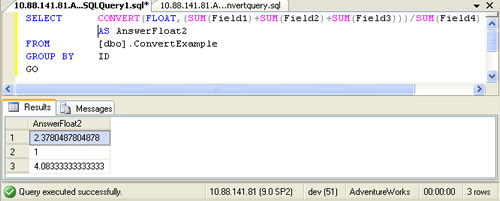
SELECT CONVERT(FLOAT,(SUM(Field1)+SUM(Field2)+SUM(Field3)))/SUM(Field4) AS AnswerFloat2
FROM [dbo].ConvertExample
GROUP BY ID
GO
Conclusion
When we expect the results in floating or decimals then we need to convert or cast the numerator part to get the accurate results with FLOAT or DECIMAL Whichever needed.
Reference : Pinal Dave (https://darkslategrey-bat-805937.hostingersite.com)